Showing posts with label Xolo Q700S. Show all posts

Thursday, June 12, 2014

AOSP Turbo Edition, Lightest ROM For Cherry Mobile Flare S2


Another special edition custom ROM arrives on Cherry Mobile Flare S2


When Xolo Q700S firmware came to give the development of Cherry Mobile Flare S2 a hand, it offered a sudden increase of success possibilities for the tweaks to work well on the said device. That's is why having an OEM version of the smartphone with a lot of developers is a great advantage, Cherry Mobile Flare S2 is a great example.

aosp turbo edition flare s2
For those Cherry Mobile Flare S2 users who just want to experience fast gaming and snappy multitasking, the custom ROM you have been waiting for has arrived. The Xolo-Based AOSP Turbo Edition flaunts the Lightest custom ROM which only amounts 151.1 MB (awesome!) available for Cherry Mobile Flare S2 having a Xolo Q700S firmware. This special edition custom ROM is another reason for Cherry Mobile Flare S2 users to modify their smartphone, so if you are one of them, continue with the installation process below.

How to get flashed Xolo-based AOSP Turbo Edition, Lightest ROM on Cherry Mobile Flare S2 with Xolo Q700s firmware?


Following the article will help you get AOSP Turbo Edition ROM installed in your Flare S2. Be sure to carefully follow what is asked and what is instructed before messing up with your device.

Disclaimer: Flashed the presented custom ROM at your own risk. Following the guide is your choice therefore, it is your full responsibility for whatever your device might came up.

Note from the developer:
This is my 1st ROM port :D
  • Flare S2 must be upgraded to "XOLO FIRMWARE" don't proceed if you have FS2/Stock Firmware
  • Read all info before asking
  • Respect the work
  • You can report bugs in a nice way

Features:

    • AOSP Look and Feel
    • Debloated
    • 210 DPI
    • Trebuchet Launcher
    • Minimal RAM usage (good for gamers)
    • 4.3 Ported Camera, no force close
    • DSP Manager
    • Superuser by Koush
    • Minimal GApps
    • cLock(CM10.1 clock and weather widget)
    • CM10.1 Mms.apk
    • CyanogenMod
    • Torch
    • Integrated Perfomance Control app
    • CyanogenMod Calculator
    • Cherryness Removed
    • Google Play Edition boot and shutdown animation
    • Google Play Music as default music player
    • ADB Insecure
Tweaks:

    • Zipaligned
    • SQLite optimization
    • build.prop tweaks
    • Automatic RAM Booster/Flusher
    • Internet speed tweak
    • sHaveged entropy generator
    • Loopy smoothness tweak
Integrated apps on Settings:
    • Greenify
    • Xposed Installer
    • GravityBox
    • Battery Calibration
    • Terminal Emulator
    • Superuser
    • Perfomance Control 
Tips and Tricks:
  • Boost your RAM via Terminal Emulator, open Terminal Emulator, type su -c boost. Wait until it's finished. Enjoy the boost. 
Enable RAM Swap:
  • Open Terminal Emulator. Type su -c rak. Wait until the process is finished. Close Terminal Emulator. Enjoy the blazing speed! 
Turn off RAM Swap:
  • Open Terminal Emulator. Type su -c off. Wait for the process. Close Terminal Emulator. 

aosp cherry mobile flare s2

Download Link:


Requirements:
Installation:
    • Download the files and put the files to the root of Flare S2 phone SD card.
    • Boot to CWM recovery mode.
    • Optional (Make a backup of your ROM if you don't have one. Follow this guide.)
    • Wipe data/factory reset, Wipe cache, Wipe dalvic cache
    • Go to Install Zip from SD card
    • Choose AOSP Turbo Edition.zip and proceed to install and wait until it's completed
    • Once done, do Wipe data/factory reset
    • Again, go to Install Zip from SD card
    • Select Storage-CameraFC-FIXED.zip and proceed to install and wait until it's completed
    • When done, reboot the system.
Camera Fix: Try to use Stock Camera from Xolo, or download 3rd-Party apps from Google Play Store.


credits:
XDA-developer, Alkane Mallari, Kards Le Sharpeye, Xolo Groups, Sa nagbabayad ng kuryente namin & to all who help me (Reymar) to build this port rom :D


Thursday, June 5, 2014

LeWa OS ROM For Cherry Mobile Flare S2 with Xolo Q700S Firmware

One of my favorite custom ROM, Lewa OS is available on your Cherry Mobile Flare S2 running Xolo Q700S Firmware.


If you're excited getting a custom ROM available for your Cherry Mobile Flare S2, well, here is my treat for you! But, it's not just it will simply work on Cherry Mobile Flare S2 because first, you need to upgrade your Flare S2 firmware with Xolo Q700S' firmware in order for that to work, otherwise, it will just damage your phone or brick it. Once you have started flashing this custom ROM, flashing other ROMs will be a lot easier.

flare s2 xolo q700s lewa
I will be presenting you a tutorial on how to be able to get this Lewa OS custom ROM port flashed in your beloved Cherry Mobile Flare S2 with Xolo Q700s firmware. It is as simple as flashing other ROMs but just be sure that you complied all the requirements. Follow the guide below to get it started.

[ROM][PORT][Flare S2 with XOLO Q700S FW BASED] 

Lewa OS


Disclaimer: Do the flashing at your own risk. We are just here to help so don't blame us for any damage after flashing. Do enough research before messing up with your device.

FEATURES:

Common:
    • Rooted
    • Zipaligned
    • Deodexed
    • Busybox with init.d support
    • Unsecure boot.img for ADB Access
Exclusive:
    • Minimalistic
    • Lots of customizations
    • A little difference with MIUI
    • More Optimized and Cleaned
ROM Download:
Requirements:
Optional:

Installation: (Flash on TWRP or CWM ONLY!)

1. Download the ROM and put it to the root folder of your SD card.

2. Reboot your Flare S2 into recovery mode (Volume up + Power key) or use a rebooter app.

3. Wipe your data/factory reset, Wipe cache, Wipe dalvik cache (Important)

4. Then go to "Install Zip from sdcard"

5. Select LewaOS_Q820_060214.zip file.

6. Wait for the flashing process to complete.

7. Reboot the phone.

8. Enjoy.


Enjoy the new LeWa OS ROM on your Cherry Mobile Flare S2 having Xolo Q700S Firmware!


credits:
XDA Forums, Kards Sharpeye for xolo fw,cam fix, Google, Needrom, Allain Gem and John Reniel Caluag


Wednesday, June 4, 2014

How to upgrade Cherry Mobile Flare S2 to Xolo q700s Firmware

Cherry Mobile Flare S2 and Xolo Q700s alike?


Have you been working so hard to get a mod and or a custom ROM for your Cherry Mobile Flare S2 while on the other hand, its OEM version Xolo Q700s enjoys a lot of mods and custom ROMs? This article will help you.

Following the guide below will help you upgrade, migrate, convert or whatever you say it, your Cherry Mobile Flare S2 into Xolo Q700s' official firmware, and with that, it allows your Flare S2 to easily port custom ROMs and also enjoy the ROMs which are made for Xolo Q700s too.

flare s2 to xolo q700s
But why I need to convert my Cherry Mobile Flare S2 firmware with Xolo Q700s'? Simply because Flare S2 has a different region or partition which made it difficult when porting ROMs, and since its OEM version, Xolo Q700s, has a lots of mods, it is very wise to use that advantage to upgrade the firmware so that Flare S2 can also enjoy the mods available for Xolo Q700s

Let's proceed to the guide below to get the upgrade started.

How to upgrade Cherry Mobile Flare S2 to Xolo q700s' official firmware


Disclaimer: Please read and understand what is told. Do it at your own risk. Upgrading firmware is sensitive and can possibly brick your phone when done wrong so be careful. We are not responsible for any damages it may possibly cause.

Advantages:

  • Converts Cherry Mobile Flare S2 to Xolo Q700s
  • Can apply ROMs, mods, etc that are made for Xolo Q700s
  • Simply, more tweaks and mods
Here are all the things you need:

Note: After downloading all necessary files, extract Xolo Q700s firmware and Xolo Usrdata and Cache in ONE folder only anywhere in your computer (let's name the folder Xolo Q700s Firmware). Also extract SP Flash Tool anywhere you want, then install Drivers Auto Installer (run install.bat and just wait for it to finish installing the drivers).
Steps:

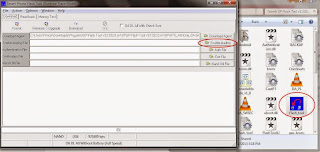
1. Open SP Flash Tools and run Flash_tool.exe


sp flash tool

2. Click Scatter-loading, a new window will appear looking for the scatter file, go to the Xolo Q700s Firmware folder and select MT6582_Android_scatter_emmc.txt and click Open.

3. The Xolo firmware is now loaded therefore all partitions in the list are checked automatically, if not are all checked automatically, you have not placed the Xolo Q700s and Usrdata and Cache in the same folder so put them in one and load the scatter file again.

4. Switch OFF or turn OFF your phone. When it is already off, plug-in the USB cable to your computer but NOT in your Flare S2.

5. Click on Firmware > Upgrade

6. Plug-in the USB cable to your Flare S2 and after few seconds, SP Flash Tool will detect your phone and it will start the upgrade.

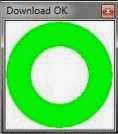
7. Wait. If you see this image below appeared, the tool has finished the upgrade.

download ok

8. Disconnect or unplug USB cable from your phone to your computer.

9. Reboot your phone to recovery mode (Press and hold Volume up + Power button at the same time and wait until you need to choose recovery, press Volume down)

10. Do all wipe. Wipe cache partition, Wipe data/factory reset, go to advance and Wipe dalvic cache

11.Now go back and reboot system. Done!

Congratulations! You now have successfully upgrade your Cherry Mobile Flare S2 to Xolo Q700s!


Credits to Sotie Arlos FuentesKards Le Sharpeye