Showing posts with label MyPhone Agua Rio Lite. Show all posts

Thursday, June 5, 2014

Swap Storage on MyPhone Rio Lite with Carbon Swap

Storage problem with MyPhone Rio Lite?


It's been a good start modifying what comes with MyPhone Rio Lite out of the box, we have already rooted it, and get custom recovery installed into it. But if it is not enough for you and your storage problems was not given a solution, especially those who installs much of apps particularly heavy games, swapping your phone's internal storage with external SD card storage might solve your worries.

myphone rio lite swap

Carbon Swap mod for MyPhone Rio Lite


To address the issues regarding your phone's internal and external storage via SD card, this swaping mod will help you how to get rid of MyPhone Rio Lite storage problems, this will definitely benefit those who have much more SD card storage space.

Here's how to use SWAP phone's internal storage with external storage (SD card) on MyPhone Rio Lite

credits to Miyer C. Bernabe

What does it can do?

  • It will swap your phone's storage with SD-card storage and vice-versa. Basically, you need SD card to do this.
Requirements:
Installation:

(Optional) Backup your important files and put them in your computer or USB Flash Drives. Also, backup your phone using the custom recovery you are having just in case something went wrong. 

1. Download the Carbon Swap for Rio Lite.zip and put it to your SD card.

2. Boot to Recovery mode.

3. Install zip from SD card

4. Find and select Carbon Swap for Rio Lite.zip

5. Install it and wait.

6. Done! Reboot system.

Now your MyPhone Rio Lite storage has been swapped. Enjoy!


Ho to unswap or uninstall the mod?


  • Just do the installation again and it will undo the changes.


Monday, June 2, 2014

Flashable Stock ROM for MyPhone Rio Lite

Here's Stock ROM made for MyPhone Rio Lite


So you've been looking for a Stock ROM? Most probably, you are searching for this because you want to go back on your Stock ROM state or use it as a backup or even use it to make your own mod, well, I guess you are lucky for finding out this article that will answer your problem.

myphone rio lite stock
Continuing this article will help you how to go back to your previous Stock ROM state of your MyPhone Rio Lite through this ROM list flashable from a custom recovery such as CWMR / CTR / TWRP or through SP Flash Tool that is capable of fixing your device even you have bricked it.

Flashable Stock ROM's available for MyPhone Rio Lite


Note: Though the ROMs are tested, please flash them at your own risk. We are not responsible for any damage it can possibly cause to your device.

Stock ROM flashable through Custom Recovery


Requirements:
Features:

  • Not Deodexed
  • Not Swapped
  • Not Partitioned
  • Remains the current Recovery


Stock ROM Download Link:

Instructions:

1. Download the Stock ROM.zip and place it to your phone's SD card.

2. Reboot your phone to Recovery (CWM, TWRP, CTR, don't do this if you own Stock Recovery). Press and hold Volume Up + Volume Down + Power Button at the same time, further press Volume Up.

3. Optional, backup your current ROM. Go to backup and restore select backup.

4. Now, select Wipe data / Factory reset, select Wipe cache, go to advance and then Wipe dalvik cache.

5. Select install zip from SD card, then select choose from internal / external SD card (wherever you put the Stock ROM.zip). Select the Stock ROM.zip and wait for it to install the stock ROM.

6. Once it's done, select Reboot system to restart your phone.

7. Enjoy the stock ROM.

Additional Notice: If you want to unroot your MyPhone Rio Lite, follow this unrooting guide.

Stock ROM flashable through SP Flash Tool


Requirements:
  • MyPhone Rio Lite with USB Cable
  • Computer running Windows
  • SP Flash Tool - Download here
  • USB Drivers - Download here
  • 7-Zip for extracting zip files - Download here
  • MyPhone Rio Lite Stock ROM (download below)
Features:

  • Completely Restores Stock ROM including the Stock Recovery
Stock ROM/Official Firmware Download Link:


Instructions:

1. Download and install USB Drivers on your computer. This will allow your computer to detect your device even on Preloader.

2. Download both SP Flash Tool and Stock ROM then extract them to any preferred location you like in your computer.

3. Don't plug-in your phone yet. Open SP Flash Tool.exe then click Scatter-loading then find and select MT6582_Android_scatter.txt in the folder where you extracted Rio Lite's Stock ROM.

4. Make sure that the Preloader, DSP_BL, Cache, and Usrdata are NOT checked and others must be checked. Now turn OFF your phone. When your phone is already turned-off, proceed to step 5.

rom backup restore

5. From SP Flash Tool, click Download then immediately connect your phone to your computer using USB Cable, don't turn-on your phone.

6. When you see a red and blue colors loading at the bottom of SP Flash Tool, it means the tool detected your device and it will restore the Stock ROM of MyPhone Rio Lite so just wait.

7. When the below image appears, you are done reverting to Stock ROM. Now, disconnect the USB Cable from your phone and turn on your MyPhone Rio Lite.

rom download

Congrats! You have now the Stock ROM.


credits to Gregson II Marvey Tee


CTR / CWM Recovery for MyPhone Rio Lite

Carliv Touch and ClockworkMod Recovery for MyPhone Rio Lite?


Just like any other MTK-based android smartphone, MyPhone Rio Lite has already ClockworkMod Recovery available which you can use basically on flashing mods and using other additional features in it most especially doing nandroid backup and restore. But today's article will not just be ordinary guide for you to get CWM recovery installed on your MyPhone Rio Lite because on this article, I'll be sharing too the CWM-based recovery which supports touch function, the Carliv Touch Recovery also known as CTR.

myphone rio lite cwm
The following is the guide how will you able to install CWM Recovery and Carliv Touch Recovery on your MyPhone Rio Lite. We have made this easier for you so all you have to do is carefully follow and understand the steps that we have put up.

How to Install CWM and CTR Recovery on MyPhone Rio Lite


Disclaimer: Flash the custom recoveries at your own responsibility.

Flashing Carliv Touch Recovery


Features:

  • CWM-based so it is just like CWM
  • Touchscreen Support

Requirements:


Optional:


Instructions:

1. Download and install Mobile Uncle Tools on your MyPhone Rio Lite.

2. Download and put Carliv Touch Recovery image on your phone's SD card. It's filename is recovery.img

3. Open Mobile Uncle Toos, if it asks you for root permission, grant it.

4. From Mobile Uncle Tools, tap Recovery Update then choose the recovery.img which is the Carliv Touch Recovery.

5. Select OK and wait for the app to flash and update the recovery.

6. Once done, tap Into Recovery Mode to reboot into recovery.

7. Done. Try to check your new custom recovery.

Note: The CTR screen might rotate but it does not harm at all.

Flashing ClockworkMod Recovery


If you don't want the touch supported custom recovery above, follow this guide how to install CWM recovery that works on MyPhone Rio Lite.


credits to Miyer Bernabe


How To Root MyPhone Rio Lite


Way to get MyPhone Rio Lite rooted


MyPhone Rio Lite is another budget, quad-core smartphone which comes in a lighter version of the original Rio. And just like the original Rio, some mods are also applicable to this lite version from which we are going to show you on this article.

MyPhone Rio Lite has the same root exploit with its original version. Before we get started on the procedures on how to root the said device, it is always recommended to understand what is rooting, otherwise, let's get started.

myphone rio lite

Guide How To Root MyPhone Rio Lite


Disclaimer: Root your device at your own risk. Don't blame us for the damage it may cause.

Optional:
Backup your unrooted MyPhone Rio Lite using this guide.

Requirements:

Instructions:


1. Download and install Framaroot. (Be sure that Unknown sources was enabled on your phone Settings > Security.)

2. Open Framaroot, select Install SuperSU.

3. Tap Barahir. Proceed and wait for the app to root your MyPhone Rio Lite.

4. Done. Reboot to properly load the changes.


Tuesday, April 29, 2014

Official MyPhone Agua Rio Lite Specs and Price

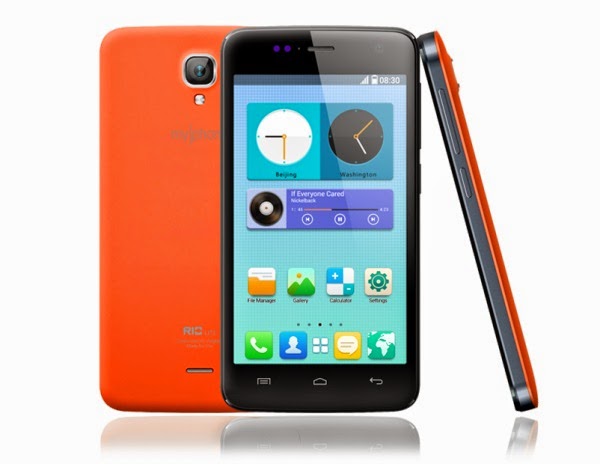
myphone agua rio lite

After being mobbed on kiosks, MyPhone officially released Agua Rio's Lite version, an even more affordable Android smartphone with a Quad Core power. Priced a thousand less than Rio's, MyPhone Agua Rio Lite still has a specs that cannot be easily taken down.

MyPhone Agua Rio Lite is an offer you can't ignore especially for those who wants to experience a four times performance, four times of fun and excitement in an even more affordable price, this indeed will be a very good opportunity to grab.

As being a Lite version of MyPhone Agua Rio, the first impression will be the reductiong of its size and dimension from its regular release. This smartphone comes with a preloaded Android 4.2 Jelly Bean with a powerful MT6582M SoC chipset having a ARM Cortex A7 Quad Core CPU clocked at 1.3 Gigahertz and a Mali 400 MP2 GPU clocked at 416 Megahertz, this surely make the users amazed. It also inbuilt with a 512 Megabytes of RAM just half of the regular release and a the same Internal Memory size of 4 Gigabytes which is expandable by a SD-card that can handle up to 32 Gigabytes.

Regarding its display, this smartphone comes with 4.7 inch WVGA IPS with a 480x800 screen resolution, enough for better viewing experience. Also prepacked with a 5 Megapixel auto-focus main camera with LED flash, just a little bit smaller than Rio's 8MP cam, and a 2 Megapixel front facing camera. Talking about its connectivity, this phone can surf the internet amazingly fast having a WiFi connectivity or through 3G up to HSPA+. MyPhone Agua Rio Lite can support Dual SIM capable of dual standby, further, can transfer files using Bluetooth. As the same battery pack of 2000mAh than the regular ones, this Lite version can last longer than its regular one due to its difference of screen size.

myphone rio lite

With a little bit of difference in screen size, RAM and main camera, but with a less than a thousand price at Php 3,999, MyPhone Agua Rio Lite will sure be the next top of the android fans versus its regular ones. Right now, get your line on MyPhone stores and kiosks to grab this nice device.


Get the latest updates from MyPhone's Facebook Page.
Photo credits to MyPhone.


Searching for tutorials for this smartphone?