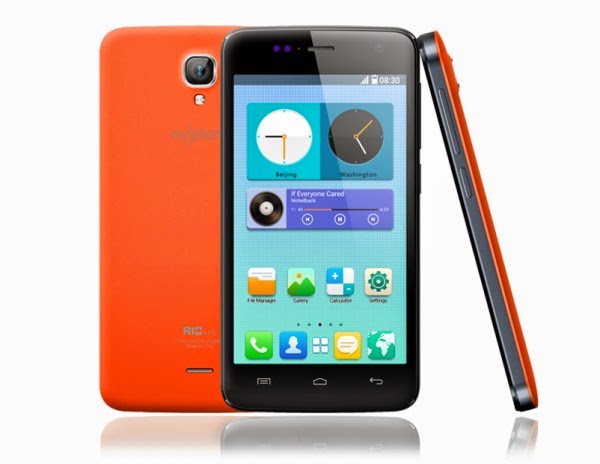
Showing posts with label Rio. Show all posts

Friday, September 19, 2014

How To Root MyPhone Rio Craze in 6 Steps

Myphone Rio brings pinoy crown an android craze


MyPhone continues its way on releasing budget smartphones to bring the mass the new Android Kitkat experience. How could Pinoy take this offer for granted?

Unbox MyPhone Rio Craze, the root way


The new MyPhone is built with an unusual chipset from which it was mainly the reason why it differs from the method of rooting we usually do from its recent Rio series. This time, let me present the rooting exploit that actually worked on my friend's budget-friendly Kitkat android smartphone, MyPhone Rio Craze, that might worked to yours as well.

Guide to Root MyPhone Rio Craze running Android 4.4 Kitkat


Hereinafter this guide, it may help you to successfully gain root access to your MyPhone Rio Craze. Just make sure to carefully read the instructions before trying to do something.

root myphone rio craze
Disclaimer: Do this at your own risk. You are solely responsible for the changes you'll be making to your device. I am just here to share.

Don't forget to know what is rooting and its pros and cons.
It is always best to have your smartphone back-upped. Try to secure your important files, contacts, messages. Visit this link to know more how to backup your smartphone.

Steps:

1. Install PdaNet and VRoot to your computer. (Download links are found at the bottom of this guide.)

2. From your MP Rio Craze, go to Settings > Developer options > enable USB Debugging.

3. Connect your smartphone to your computer using USB cable.

4. Wait for your device to be detected by your computer.

5. From your computer, right-click VRoot app and run it as administrator, accept and press the Root button (green button).

6. Wait for the confirmation if your smartphone was successfully rooted and that's it!


After rooting, your phone may reboot itself so don't worry about it. Check if your phone has complete root access by using Root Checker app available from Google Play Store.

Credits to the Developers of the apps used.

Download links:

Monday, June 30, 2014

MyPhone Agua Rio Color OS custom ROM on S5501

New custom ROM for MyPhone Agua Rio


Choosing proper mods and ROM for MyPhone Agua Rio has been a little bit confusing as the popular Rio came with so many build versions which causes too much complains on the users' side. But the least for the developers can do is make a mod that will guarantee its functionality on a specific Rio version that's why another custom ROM came to bring MyPhone Agua Rio another look.

From the popular Oppo OS, here comes Rio Color OS


If you were amazed with awesome interface of the famous Oppo OS, one of  MyPhone Agua Rio (S5501) users, Marion Benizano, found a way to port this on his android phone and finally released it to the Rio crowd. Getting excited? Here's the moment you've been waiting for Oppo Color OS fans.

MyPhone Agua Rio Color OS custom ROM on S5501

myphone rio color os

Following the guide below will assist you to get MyPhone Agua Rio Color OS ported from OPPO on your beloved android smartphone. Comply the things necessary for the installation and carefully follow the instructions.

Warning! Flash at your own risk.

Notes from the porter:
Please respect this post..

The popular OPPO OS is now in our MyPhone Rio. Introducing Rio Color OS..
 This is base on Oppo R1 rom.. And Ported to Rio New Versions S5501..(Not yet tested in Old versions)..

Downloadable Themes, Wallpapers, Lock-screen and many more.
Working all Gestures and Motion Except for the Off-screen gestures.
Wifi and Blootooth working perfectly.
Completely compatible with rio repartition tool.

Things you need:

  • MyPhone Agua Rio S5501 unit
  • Rooted - visit here to root
  • TWRP or CWM Recovery - visit here to get custom recovery
  • RioColorOS ROM - download here


Installation:

1. Download and RioColorOS_by_Marion.zip and put it to your Rio's SD card.

2. Boot to custom recovery. (CWM/TWRP)

3. Backup your phone. If you don't know how, here's how to backup on CWM or TWRP.

4. Wipe data/factory reset, Wipe cache, Wipe dalvic cache.

5. Go to mounts and storage, format system.

4. Go to Install Zip from SD card.

5. Choose RioColorOS_by_Marion.zip and proceed to install.

6. Wait and reboot. Done!

Enjoy your new MyPhone Rio Color OS!


Additional Notice:
Take note of some ROM issues:

Key board is not working properly so you have to manually fix in settings.

  1. Go to settings
  2. General Tab
  3. Language and Input
  4. Choose Oppo Keyboard as Default


Internal Storage is not accessible in PC only External Storage will be detected.(may be because the phone where the original ROM came from has is non expandable.

Please leave a comment if you discover another bug in this ROM.

Tips:
To show the carrier icons like the one in the screenshots just go to Display tab and tap Carrier info then choose Show carrier icon.

You can add more Gesture under General tab > Gesture &motion.

Swipe down to the right to open the notification panel and swipe down to the left to open gesture panel.


credits:
Marion Frances Benizano, Google for sources and research, XDA for the Porting guide, Other rom Developer for the advice.


Sunday, June 8, 2014

MyPhone Agua Rio v1.17 full Stock ROM dump | SP Flash Tool


Searching for Full ROM dump for MyPhone Agua Rio S5501 v1.17


If you are looking for the best way to restore your MyPhone Agua Rio S5501 v1.17 into its factory default system, then flashing the full stock ROM dump will definitely answer your problem. Through SP Flash Tool, even a hardly-tweaked MyPhone Agua Rio can still be restored into its fresh stock state in just a very simple way. However, unlike the popular nandroid backup using custom recoveries, this procedure requires you to have a computer, PC or laptop will do, to successfully make this method work. For those who doubt to try this method of flashing, well, this is very worthy as it fixes most problems that occur in any Mediatek (MTK) devices including MyPhone Agua Rio.

myphone rio stock rom dump
Flashing through SP Flash Tools follows a lot of risk that might even break your phone when done wrong, making it unusable. You must be sure that the ROM or partition you are flashing really suits with your device or else, worst things will be suffered by your device. So to MyPhone Rio users, you must flash the right ROM for your device. Also, flashing the preloader is very sensitive so just flash it whenever it is just needed as much badly. As any developers and modders telling you, always have a backup just so you have anything to restore whenever worst situations came. Read this separate article on how to backup.

How To Flash Full Stock ROM Dump For MyPhone Agua Rio S5501 v1.17


Flashing needs a knowledge and understanding so better research enough about what you are doing. Now, if you are fully decided, proceed below to flash the Full Stock ROM dump of MyPhone Agua Rio.

Requirements
  • Computer with Windows operating system
  • USB Cable
  • MTK USB Drivers - Download it here and install it (credits to the developer of this tool)
  • SP Flash Tool - Get it here (download the recommended or latest version and extract it to you PC)
  • MyPhone Rio v1.17 Stock ROM - download below

Flash Full Stock ROM Dump for MyPhone Agua Rio S5501 v1.17 by Edmhar Laoag (send him your thanks or donate him)


GOOD LUCK!


Thursday, June 5, 2014

Swap Storage on MyPhone Rio Lite with Carbon Swap

Storage problem with MyPhone Rio Lite?


It's been a good start modifying what comes with MyPhone Rio Lite out of the box, we have already rooted it, and get custom recovery installed into it. But if it is not enough for you and your storage problems was not given a solution, especially those who installs much of apps particularly heavy games, swapping your phone's internal storage with external SD card storage might solve your worries.

myphone rio lite swap

Carbon Swap mod for MyPhone Rio Lite


To address the issues regarding your phone's internal and external storage via SD card, this swaping mod will help you how to get rid of MyPhone Rio Lite storage problems, this will definitely benefit those who have much more SD card storage space.

Here's how to use SWAP phone's internal storage with external storage (SD card) on MyPhone Rio Lite

credits to Miyer C. Bernabe

What does it can do?

  • It will swap your phone's storage with SD-card storage and vice-versa. Basically, you need SD card to do this.
Requirements:
Installation:

(Optional) Backup your important files and put them in your computer or USB Flash Drives. Also, backup your phone using the custom recovery you are having just in case something went wrong. 

1. Download the Carbon Swap for Rio Lite.zip and put it to your SD card.

2. Boot to Recovery mode.

3. Install zip from SD card

4. Find and select Carbon Swap for Rio Lite.zip

5. Install it and wait.

6. Done! Reboot system.

Now your MyPhone Rio Lite storage has been swapped. Enjoy!


Ho to unswap or uninstall the mod?


  • Just do the installation again and it will undo the changes.


Wednesday, June 4, 2014

Carliv Touch Recovery (CWM-based) for MyPhone Rio Fun

Want to a custom recovery on your MyPhone Rio Fun-packed smartphone?


Just after few browsing some sites and hearing from those who have owned MyPhone Rio Fun, I have found out that there's so many MyPhone Rio Fun users out there suffering from non-customized recovery. That is why I reached someone who owned this kind of phone, naming Mersean Edra, and helped him to get a solution for their problem. Fortunately, we came up to a positive result, and here it is, the CWM-based custom recovery called Carliv Touch Recovery for MyPhone Rio Fun. Thanks Mersean for testing.

myphone rio fun cwm
Following this guide, you will find out how to get CWM-based Carliv Touch Recovery ported your MyPhone Rio Fun. We have put up the steps to make it as easier and more understandable even for a new android user. Just carefully follow the steps to get this installed successfully.

How To Flash Carliv Touch Recovery (CWM-based) on MyPhone Rio Fun


Please Read: Do the process at your own risk. We are not liable for any damage it may cause to your device even though this was tested.

Features:

  • Aroma File Manager (built-in)
  • Well-categorized menu/options
  • Touch-enabled interface.

Recovery Download:

Installation Instructions:


The procedure is a bit confusing for beginners so I made a very informative article separately on how to do flash this recovery on MyPhone Rio Fun. All you need to do is follow what is asked.

If you are done, you can now relief your self :D

Success! Finally, you have flashed a CWM-based custom recovery on your MyPhone Rio Fun.


Start to backup immediately, it's just the same as CWM, follow this tutorial.


Credits to yuweng, carliv, dhinesh77, XDA


Monday, June 2, 2014

Flashable Stock ROM for MyPhone Rio Lite

Here's Stock ROM made for MyPhone Rio Lite


So you've been looking for a Stock ROM? Most probably, you are searching for this because you want to go back on your Stock ROM state or use it as a backup or even use it to make your own mod, well, I guess you are lucky for finding out this article that will answer your problem.

myphone rio lite stock
Continuing this article will help you how to go back to your previous Stock ROM state of your MyPhone Rio Lite through this ROM list flashable from a custom recovery such as CWMR / CTR / TWRP or through SP Flash Tool that is capable of fixing your device even you have bricked it.

Flashable Stock ROM's available for MyPhone Rio Lite


Note: Though the ROMs are tested, please flash them at your own risk. We are not responsible for any damage it can possibly cause to your device.

Stock ROM flashable through Custom Recovery


Requirements:
Features:

  • Not Deodexed
  • Not Swapped
  • Not Partitioned
  • Remains the current Recovery


Stock ROM Download Link:

Instructions:

1. Download the Stock ROM.zip and place it to your phone's SD card.

2. Reboot your phone to Recovery (CWM, TWRP, CTR, don't do this if you own Stock Recovery). Press and hold Volume Up + Volume Down + Power Button at the same time, further press Volume Up.

3. Optional, backup your current ROM. Go to backup and restore select backup.

4. Now, select Wipe data / Factory reset, select Wipe cache, go to advance and then Wipe dalvik cache.

5. Select install zip from SD card, then select choose from internal / external SD card (wherever you put the Stock ROM.zip). Select the Stock ROM.zip and wait for it to install the stock ROM.

6. Once it's done, select Reboot system to restart your phone.

7. Enjoy the stock ROM.

Additional Notice: If you want to unroot your MyPhone Rio Lite, follow this unrooting guide.

Stock ROM flashable through SP Flash Tool


Requirements:
  • MyPhone Rio Lite with USB Cable
  • Computer running Windows
  • SP Flash Tool - Download here
  • USB Drivers - Download here
  • 7-Zip for extracting zip files - Download here
  • MyPhone Rio Lite Stock ROM (download below)
Features:

  • Completely Restores Stock ROM including the Stock Recovery
Stock ROM/Official Firmware Download Link:


Instructions:

1. Download and install USB Drivers on your computer. This will allow your computer to detect your device even on Preloader.

2. Download both SP Flash Tool and Stock ROM then extract them to any preferred location you like in your computer.

3. Don't plug-in your phone yet. Open SP Flash Tool.exe then click Scatter-loading then find and select MT6582_Android_scatter.txt in the folder where you extracted Rio Lite's Stock ROM.

4. Make sure that the Preloader, DSP_BL, Cache, and Usrdata are NOT checked and others must be checked. Now turn OFF your phone. When your phone is already turned-off, proceed to step 5.

rom backup restore

5. From SP Flash Tool, click Download then immediately connect your phone to your computer using USB Cable, don't turn-on your phone.

6. When you see a red and blue colors loading at the bottom of SP Flash Tool, it means the tool detected your device and it will restore the Stock ROM of MyPhone Rio Lite so just wait.

7. When the below image appears, you are done reverting to Stock ROM. Now, disconnect the USB Cable from your phone and turn on your MyPhone Rio Lite.

rom download

Congrats! You have now the Stock ROM.


credits to Gregson II Marvey Tee


CTR / CWM Recovery for MyPhone Rio Lite

Carliv Touch and ClockworkMod Recovery for MyPhone Rio Lite?


Just like any other MTK-based android smartphone, MyPhone Rio Lite has already ClockworkMod Recovery available which you can use basically on flashing mods and using other additional features in it most especially doing nandroid backup and restore. But today's article will not just be ordinary guide for you to get CWM recovery installed on your MyPhone Rio Lite because on this article, I'll be sharing too the CWM-based recovery which supports touch function, the Carliv Touch Recovery also known as CTR.

myphone rio lite cwm
The following is the guide how will you able to install CWM Recovery and Carliv Touch Recovery on your MyPhone Rio Lite. We have made this easier for you so all you have to do is carefully follow and understand the steps that we have put up.

How to Install CWM and CTR Recovery on MyPhone Rio Lite


Disclaimer: Flash the custom recoveries at your own responsibility.

Flashing Carliv Touch Recovery


Features:

  • CWM-based so it is just like CWM
  • Touchscreen Support

Requirements:


Optional:


Instructions:

1. Download and install Mobile Uncle Tools on your MyPhone Rio Lite.

2. Download and put Carliv Touch Recovery image on your phone's SD card. It's filename is recovery.img

3. Open Mobile Uncle Toos, if it asks you for root permission, grant it.

4. From Mobile Uncle Tools, tap Recovery Update then choose the recovery.img which is the Carliv Touch Recovery.

5. Select OK and wait for the app to flash and update the recovery.

6. Once done, tap Into Recovery Mode to reboot into recovery.

7. Done. Try to check your new custom recovery.

Note: The CTR screen might rotate but it does not harm at all.

Flashing ClockworkMod Recovery


If you don't want the touch supported custom recovery above, follow this guide how to install CWM recovery that works on MyPhone Rio Lite.


credits to Miyer Bernabe


How To Root MyPhone Rio Lite


Way to get MyPhone Rio Lite rooted


MyPhone Rio Lite is another budget, quad-core smartphone which comes in a lighter version of the original Rio. And just like the original Rio, some mods are also applicable to this lite version from which we are going to show you on this article.

MyPhone Rio Lite has the same root exploit with its original version. Before we get started on the procedures on how to root the said device, it is always recommended to understand what is rooting, otherwise, let's get started.

myphone rio lite

Guide How To Root MyPhone Rio Lite


Disclaimer: Root your device at your own risk. Don't blame us for the damage it may cause.

Optional:
Backup your unrooted MyPhone Rio Lite using this guide.

Requirements:

Instructions:


1. Download and install Framaroot. (Be sure that Unknown sources was enabled on your phone Settings > Security.)

2. Open Framaroot, select Install SuperSU.

3. Tap Barahir. Proceed and wait for the app to root your MyPhone Rio Lite.

4. Done. Reboot to properly load the changes.


Friday, May 30, 2014

Learn How To Root MyPhone Rio Fun

Got the latest MyPhone Rio Fun?


Rio has stayed in fame on the quad-core smartphone category. Right from the edge, MyPhone gives its shot in the dual-core smartphone scene from launching the newest MyPhone Rio series, MyPhone Rio Fun.

If you're one of those people who rushed and bought MyPhone Rio Fun, or might be the future Rio Fun user who seek for a way to tweak and enhance what MyPhone Rio Fun has out of the box, then you are in the perfect place. The first step on tweaking your fun-packed smartphone is having a proper knowledge and understanding regarding the concepts of android development which came at the same way with MyPhone Rio Fun.

root myphone rio fun

How to root MyPhone Rio Fun, the easy way!


Reading the basics of rooting is a must. Once fully familiarized that stuffs, it's the about time to proceed on how to root your MyPhone Rio Fun. To start of, any Rio Fun user must comply the necessary stuffs to successfully root your phone without or lesser problems.

Method 1: Rooting Rio Fun without using computer

The most popular android app to root most android device, Framaroot.

Caution: Please do it on your own risk. We are not liable for any damage it may cause to your device, you are doing it on your own choice.

Requirements:
MyPhone Rio Fun
Framaroot app

Steps:

1. Go to your Rio Fun phone Settings -- Security and enable or check Unknown Sources.

unknown sources

2. Download the Framaroot android app and put it to your micro-SD card.

3. Using your phone's file manager, find the Framaroot app, tap on it and select Install.

4. After installing the app, Open it. Anyways, the app will appear on your apps list/drawer.

framaroot app

5. Select Install SuperSU then further tap Boromir. From there, the app will try to root your Rio Fun so just wait a few seconds.

framaroot

6. Now its rooted. :)

framaroot supersu

7. Check the SuperSU app on your app list and verify if you have successfully rooted your Rio Fun by downloading Root Checker free app on Play Store.


credits to XDA

Tuesday, May 27, 2014

MyPhone offers more fun with Rio Fun for only P2999

MyPhone Rio Fun joins the Rio Series

Who wants to live with colors for a minimal price?... Anyone!

MyPhone has introduced their latest surprise, refreshing Rio Series to the crowd right after their successful and still very popular MyPhone Rio, here comes Rio Fun. Just like owning the fame of Rio from being the most successful quad-core pinoy-styled android smartphone, the newest MyPhone Rio Fun will try to give its shot and make a name on the Philippines' very own dual-core smartphone category.

rio fun

MyPhone brings you more Fun for only Php 2,999


myphone rio fun


MyPhone offers more pleasure for an inexpensive price value with Rio Fun featuring a dual-core processor and a large 5-inch touchscreen display, more colors to choose from with a two times fun and wide viewing experience awaits for MyPhone Rio Fun's future users.

myphone rio fun 2

MyPhone Rio Fun Specs and Features


    • Dual SIM, dual standby
    • Android 4.2 Jelly Bean
    • 5.0" TFT touchscreen display, FWVGA (480 x 854)
    • Mediatek MT6572M Chipset
    • 1.3 GHz dual-core processor
    • Mali 400 MP
    • 512 MB RAM
    • 512 MB internal storage expandable up to 32GB microSD
    • 3.2 MP main camera
    • VGA front camera
    • 2G (EDGE/GPRS), Wi-Fi, Bluetooth
    • 1800 mAh battery
    • Php 2,999


I'm sure you are impressed with the specs just before knowing that MyPhone Rio Fun doesn't have 3G connectivity support. Also, thinking of a 512 MB of internal storage, Rio Fun worries much of its lesser apps space but thanks to an expanded storage through micro SD card, at least the problem can settled. Go to Settings -- Apps -- select the non-system apps you would like to move to SD card then you're done!

rio fun 2

Aside from the main issue of connectivity which alternatively using WiFi instead, still it was not enough to cover what great offer Rio Fun has for a so much cheaper price.


Source: MyPhone Rio Fun


Custom ROM for MyPhone Agua RIO

Switch your MyPhone Agua Rio looks!


Finally, custom ROM available for MyPhone Agua Rio! This will be the much-awaited opportunity for MyPhone Agua Rio users to take their loved device out of the box and have another taste and experience the performance of the most popular smartphone looks present in the android smartphone industry.

MyPhone RIO custom ROMs
I will not prolong your excitement because on this article, I will be presenting you the collection of awesome Custom ROMs available for your adored MyPhone Agua RIO. Thanks to our very own Pinoy devs/contributors, naming Edmhar LaoagXenon Lacdang, Red, Abdul Tarim and John Reniel Caluag, for providing their knowledge and works for MyPhone Agua Rio development.

Disclaimer: Flash at your own risk. We, including the developers and the contributors, are not liable for any damage it will cause to your device.

Preparation:
  • Backup your ROM, follow this guide how to backup.
  • Backup your files in your internal and external storage to computer or somewhere safe. ROMs with swapped features formats your internal/external storage.
  • Charge for phone at least 70% to avoid interruptions.
  • Download the ROMs below which suits your RIO model and put it to your storage.
  • ONLY Flash the ROMs in CWM / TWRP recovery, NEVER flash in Stock recovery. Here's how to flash CWM / TWRP recovery in your RIO.

How to flash custom ROMs in MyPhone Agua RIO?


Flashing on TWRP:

1. Place the downloaded custom ROM in your RIO's storage
1. BACKUP
2. Reboot to TWRP.
3. Wipe Data/Factory Reset
4. Advanced options - /Wipe Dalvik/Cache/System/Data
5. Install Sample_ROM_.zip (depends on the ROM name) and wait until it's done.

  • If the ROM has a patch/add-on, Install Sample_Patch_Add-on.zip (depends on the patch name).

7. Reboot System
8. Wait and enjoy!

Flashing on ClockworkMod Recovery:

1. Place the downloaded custom ROM in your RIO's storage.
2. Backup ROM if don't have one. Follow this guide how to backup.
3. Reboot to CWM Recovery
4. Wipe Data/factory reset, Wipe Cache Partition, go to advance, Wipe Dalvik Cache
5. Select Install Zip from SD card
6. Select Choose Zip from SD card
7. Choose "Sample_Rio_ROM.zip", depends on the ROM's file name.
8. Install
9. Wait until it's done.
  • If the ROM has patch/add-on, flash it immediately after flashing the ROM. Select Choose Zip from SD card, choose "SamplePatchORAddon.zip", depends on the file name (gapps, etc..).
10. Reboot system now

Custom ROMs for MyPhone Agua RIO S5501


myphone rio miui

[S5501 ROM] MP RIO - MIUI v5 4.4.18

with Weekly OTA-Update plus Nokia X Keyboard
by: Edmhar Laoag

Description:

MyPhone Agua Rio MIUI v5 4.4.18  for S5501 Model Only. This rom  was ported from MIUI v5 for GFive A800 and supported by Ansuman Mahapatra ( helloansuman MIUI Profile HERE  of MIUI Official Developers so we can experience a weekly OTA update from MIUI.  OTA Updates will be released on every Saturday orSunday)

Features:
    • Weekly OTA update
    • NOKIA X Keyboard
    • Extreme Scrolling
    • Init.d supported
    • Zipaligned
    • Swap Storage
    • No Tweaks
    • Update to 4.4.25 via OTA
Bugs:
    • Tell us
Download Link:

NOTES:
  • MIUI is already rooted. To control ROOT access, go to Security app and go to permission then enable ROOT Permission.
  • Creating Xiaomi Account by email registration. Dont try to register using mobile number or else you'll get Php 80 prepaid load deducted to your mobile account.
  • To change English language in some options in theme/wallpaper app, JUST Go to APPS > Themes > Clear Data.
How to OTA Update MIUI Version
To update better to use TWRP. If CWM go to install zip from SDcard - toggle signature - make it disabled - go to install from SDcard - select the downloaded_ROM.zip - flash the update then reboot system now  

FAQs:
  • For beginners using MIUI, this will help: http://en.miui.com/forum.php?mod=viewthread&tid=17759&extra  


htc sense rio
htc sense myphone rio

[RIO S5501 ROM] HTC Sense UI for Rio

by: Red

Features:

    • Single Sim Only
    • Deodexed
    • ZipAligned
    • NOT YET ROOTED - You can root it RIO here
    • Swapped Storage
    • Proximity Working
    • Faster Auto Focus
    • OTG WORKING, Use 3rd Party Apps Like RootExplorer, ES File Manager, etc.
    • Screenshot, Press Power Button + Home Button

Bugs:

    • Storage Info Bug

Download Link:


rio s4 rom
myphone rio s4

[RIO S5501 ROM] MyPhone RIO S4

by: Edmhar Laoag

Features:
    • Air Gesture
    • Build.Prop Tweaks
    • Already Storage Swapped
Bugs:
    • Tell us
Download Link:
NOTE: When flashing this ROM, be sure to select YES - FIX ROOT then continue to flash the patch.


refined rio x rom

[RIO S5501 ROM] Refined RIO X

Semi-thin ROM if based from Explay Fresh
Modded by Edmhar Laoag and Sir Lorenzo Manuel Gimoto

Features:
    • Rooted
    • Xperia Bootlogo-Boot animation-Some System icons
    • Zipaligned
    • Deodexed
    • Busybox with init.d support
    • Semi-Light ROM ( 22xmb like that)
    • 3D Enhancer
    • Performance Tweaks
    • Better Ram Management 
    • Disbaled Scrolling Cache
    • Apollo with DSP Manager + (Beats Audio)
    • Build.Prop Tweaks
Bugs:
    • Tell us
Download links:


Custom ROMs for MyPhone Agua RIO S5500


sense ui rio
sense ui myphone rio

[RIO S5500 ROM] Rio Sense v1.0

by: Xenon Lacdang


Features:
    • Single Sim
    • Sense UI
    • ZipAligned
    • Deodexed
    • Init.d support
    • Busybox
    • Removed Bloatwares
    • Pre-rooted
    • Unsecured boot.img
    • Better RAM Management
    • Less Lag UI
    • OTG WORKING
    • Xperia Honami Keyboard
    • Swapped Storage
    • No Tweaks Added
Major Bugs:
    • NONE

Minor Bugs:
    • Offline Charging Animation
Download Link:


s5500 s4 rom

[RIO S5500 ROM] Samsung Galaxy S4 GT-S5500 v1.0

by: Xenon Lacdang 

Features:

    • Samsung Galaxy S4 UI
    • Dual Sim
    • Air Gesture
    • Smart Scroll
    • Note 3 Lockscreen Ink Effect
    • Viper4AndroidFx (Updated)
    • Clean Port
    • Zipaligned
    • Fully Deodexed
    • Busybox
    • Init.d Support
    • Pre-Rooted
    • Unsecured boot.img
    • Better RAM Management
    • Less Lag UI
    • OTG WORKING
    • Xperia Honami Keyboard
    • Swapped
    • No Tweaks Added

Bugs:

    • Storage Info
    • LED Notification

Download Link:

FAQ:

1. Low Loudspeaker Volume?
Go to Engineer Mode -- Hardware Testing -- Audio -- LoudSpeaker Mode -- Type = Ring -- Value=144 -- Max Vol. = 160

2. Root Problem? Root again your device.
Root your MyPhone Agua RIO here.


Pending Screenshot...

[RIO S5500 ROM] [PORT] Samsung Galaxy S5 SM-G900 v1.0

by: Xenon Lacdang

Features:

    • SINGLE SIM Only
    • Samsung Galaxy S5 UI
    • Air Gesture
    • Fully Deodexed & Zipaligned
    • Init.d support
    • Busybox
    • Pre-Rooted
    • Better Ram Management
    • Swapped

Bugs:

    • OTG
    • Storage Info
    • LED Notification
    • Proximity (Not all RIO experiences)
Download Link:
FAQ:

1. Camera shows only 1MP ?
 Go to camera settings and change the Preview size from "Full Screen" to "4:3".

2. Low Loudspeaker Volume?
Go to Engineer Mode -- Hardware Testing -- Audio -- LoudSpeaker Mode -- Type = Ring -- Value=144 -- Max Vol. = 160


myphone rio carpad t5 rom

[RIO S5500 ROM][PORT] Carpad T5 Remix

by: John Reniel Caluag

Common Features:

    • Rooted
    • Zipaligned
    • Deodexed
    • Busybox with init.d support
    • Unsecure boot.img for ADB Access

Key Features:

    • Air Gesture on Camera,Gallery
    • 13MP Rear Cam (Fake)
    • 3 icon packs (Launcher menu-appearance settings-choose)
    • S4 lockscreen

Bugs:

    • Proximity Sensor
Download Link:


NOTE:

1. Booting for the first time after flashing this ROM takes time. It's normal so just wait for it.
2. Before taking benchmark test. you must reboot your RIO first. Make sure to set the Governor to default (Hotplug) if ever you changed it.
3. DO NOT USE OTHER BOOT.IMG or KERNEL
4. DO NOT USE OTHER TWEAKS OR PERFORMANCE ENHANCEMENTS FOR IT MAY CAUSE CONFLICT.


Pending Screenshot...

[RIO S5500 ROM][PORT] GalaxyBean I S5 Edition

by: John Reniel Caluag

Common Features: 

    • Rooted
    • Zipaligned
    • Deodexed
    • Busybox with init.d support
    • Unsecure boot.img for ADB Access
Key Features:

    • 99.9 % Galaxy S5 UI
    • Single Sim Only
    • Samsung Apps

Bugs:

    • Air Gesture
    • Force closes when holding Home button on apps drawer
    • Proximity

FAQS:

1. Camera shows only 1MP ?
 Go to camera settings and change the Preview size from "Full Screen" to "4:3".


Download Link:
[RIO S5500 ROM][PORT] GalaxyBean I S5 Edition - 414 Mb

NOTE:

1. Booting for the first time after flashing this ROM takes time. It's normal so just wait for it.
2. Before taking benchmark test. you must reboot your RIO first. Make sure to set the Governor to default (Hotplug) if ever you changed it.
3. DO NOT USE OTHER BOOT.IMG or KERNEL
4. DO NOT USE OTHER TWEAKS OR PERFORMANCE ENHANCEMENTS FOR IT MAY CAUSE CONFLICT.


lewa rom myphone rio

[RIO S5500 ROM] Lewa OS v5

by: Xenon Lacdang

Features:

    • Based on v1.15 Kernel 
    • Lewa OS UI
    • Zippligned
    • Clean Port
    • Better RAM MANAGEMENT
    • Unsecured boot.img
    • Rooted
    • Less Lag UI
    • OTG Working
    • No Tweaks added
    • Xperia Honami Keyboard

Bugs:

    • Tell us

Download Link:


genesis myphone rio

[RIO S5500 ROM] Genesis AOSP Edition v1.0

by: Abdul Tarim

Feature Highlights:

    • Based on 1.15
    • Modified boot image to have init.d support
    • Light (and fast?)
    • Google PlayStore included
    • Jellybean keyboard with Swipe
    • Light tweaks
    • Rooted (install your favorite superuser/superSU app)
    • Stock camera app (not from MyPhone version)
    • Not storage-swapped

Bugs / Notes:

    • Voice unlock is disabled but still in settings, ignore it
    • No gesture (app, for lesser monitoring = saves battery)

Download Link:


IMPORTANT

It is always recommended to make a backup before doing anything in your phone. So make sure you do so. So that in case you need to bring your phone to service center or for whatever reason, you can restore it to stock/factory state configuration.

This is based on stock rom (1.15). This means that you CANNOT do a CWM or TWRP data backup of your Lewa or MIUI ROM and restore after flashing this rom. If you do, you might get into bootloop (flash another ROM to fix that). You can still try, but you may not be successful.


Credits to: XDA, NeedROM, MyPhone Rio groups, contributors/developers of the tools, those who contributed to the creators of the ROMs..